Hyundai VIN decoder
Free Hyundai VIN Decoder to check car history and specifications.
What is a Hyundai VIN?
What is Hyundai VIN decoder?

How accurate is the information provided by the Hyundai VIN decoder?
How to decode a VIN number - Hyundai VIN breakdown
VIN numbers can be divided into four main sections: World Manufacturer Identifier (WMI), Vehicle Descriptor Section (VDS), Check Digit, and Vehicle Identifier Section (VIS).Most sections hold specific information, such as model, body style, year of manufacture, etc. Only the Check Digit section consists of a single number. However, different car makers choose different meanings for each letter and number.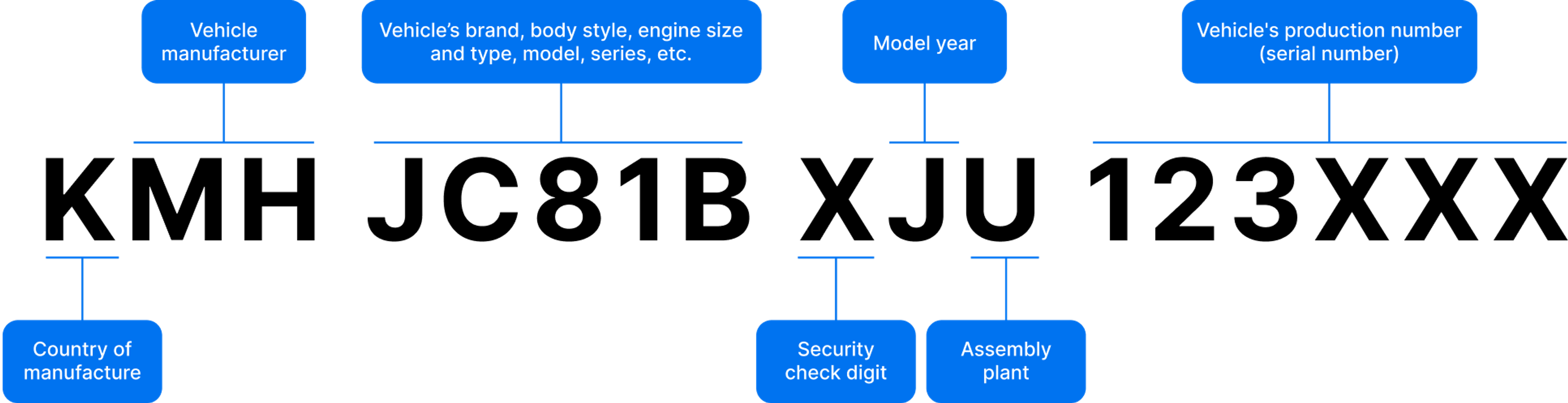 Theoretically, you can decode an entire VIN, but it’s inconvenient compared to the Hyundai VIN decoder. Nevertheless, identifying a few characters can help you reveal essential information about the car at a glance.
World Manufacturer Identifier (WMI)
The first 3 characters of a VIN number create a WMI section. The 1st character reveals the geographic zone of manufacture. The 2nd one shows the manufacturer, while the 3rd is the vehicle type.Here’s the list of possible WMI combinations in a Hyundai VIN:| WMI | Meaning |
| AC5 | Hyundai Automotive South Africa (cars) |
| KMC | Hyundai South Korea (commercial vehicle) |
| KME | Hyundai South Korea (commercial vehicle - semi-tractor truck) |
| KMF | Hyundai South Korea (commercial vehicle) |
| KMH | Hyundai South Korea (passenger & multi-purpose vehicle) |
| KMJ | Hyundai South Korea (bus & minibus) |
| KMT | Genesis Motors South Korea (passenger vehicle) |
| KMU | Genesis Motors South Korea (multi-purpose passenger vehicle) |
| KMX | Hyundai South Korea (no longer used) |
| KMZ | Hyundai South Korea (no longer used) |
| KM8 | Hyundai South Korea (multi-purpose passenger vehicle, for North America) |
| KND | Hyundai (multi-purpose vehicle made by Kia South Korea) |
| LBE | Beijing Hyundai Automotive Co Ltd. |
| MAL | Hyundai Motors India Ltd. |
| MB2 | Hyundai Motors India Ltd. (multi-purpose vehicle) |
| MF3 | Hyundai Motor Indonesia (HMID) |
| NLH | Hyundai Assan (passenger cars) |
| NLJ | Hyundai Assan (minibus, van) |
| PFD | Hyundai Motor Group Innovation Center in Singapore (HMGICS) (multi-purpose passenger vehicle) |
| TMA | Hyundai Motor Manufacturing Czech |
| TMC | Hyundai Motor Manufacturing Czech |
| U5Y | Kia Motors Slovakia (ix35 only) |
| X7M | Hyundai made by TagAz |
| XWE | Hyundai made by Avtotor |
| Z94 | Hyundai Motor Manufacturing Rus |
| 2HM | Hyundai Auto Canada (Passenger Vehicle) |
| 3KP | Hyundai (Passenger Vehicle made by Kia Motor Manufacturing Mexico) |
| 5NM | Hyundai Motor Manufacturing Alabama (Hyundai & Genesis Multi-Purpose Passenger Vehicle) |
| 5NP | Hyundai Motor Manufacturing Alabama (Hyundai Passenger Vehicle) |
| 5NT | Hyundai Motor Manufacturing Alabama (Hyundai Truck) |
| 5XY | Hyundai (Multi-Purpose Passenger Vehicle made by Kia Motor Manufacturing Georgia) |
| 8LG | Hyundai made by Aymesa in Ecuador |
| 95P | Caoa Montadora de Veículos SA (Tucson, ix35, & HR truck) |
| 9BH | Hyundai Motor Brasil (HB20 & Creta) |
These combinations are mostly found in vehicle identification numbers of later Hyundai models, therefore, sometimes WMI sections can be different for older cars.
Vehicle Descriptor Section (VDS)
The second section (VDS) consists of 5 characters, revealing information about the car’s model, engine, body type, trim levels, restraint system, and engine type. For instance, each model has its own representing character in a VIN number, helping you ensure the model is correct.Here’s what each character represents in the 4th position of a Hyundai’s VIN:| 4th character | Model line |
| A | i10, Grand i10, Xcent |
| B | Sonata 1989-1994, Grand i10, Aura, i20, Casper, Bayon |
| C | Sonata 1995-1998, Accent 2000–2022, Ioniq 2017-2022, HB20, Creta |
| D | Elantra 2001-2020, Elantra Touring 2009-2012, Elantra GT 2013-2017, i30 (FD & GD) |
| E | Sonata 2006- (US built), Sonata 2006-2019 (Korean built) |
| F | XG300, XG350, Azera 2006-2017, Genesis G80 2019-2020 (KMT), Genesis G90 2019- (KMT), H100 |
| G | Genesis sedan 2009–2016, Equus 2011-2016, Genesis G80 2017-2019 (KMH), Genesis G90 2017-2019 (KMH), Genesis G70 2019-, Genesis G80 2021- |
| H | Tiburon 2003-2008, Genesis Coupe 2010-2016, i30 (PD), Elantra GT 2018-2020, Kona 2024-, Genesis GV80 |
| J | Elantra 1992-2000, Tiburon 1997-2001, Tucson 2005-, Santa Cruz 2022-, Nexo 2019- |
| K | Kona 2018-2023, Ioniq 5 2022-, Genesis GV60 |
| L | Excel 1986-1989, Sonata 2020- (Korean built), i40, Elantra 2021-, Cantus 16 - |
| M | Entourage, Ioniq 6, Genesis GV70 |
| N | Veracruz 2007-2012 |
| P | Pony, Matrix, ix20, Creta, Grand Creta |
| R | Venue, Palisade |
| S | Santa Fe 2001-2010, Santa Fe LWB (XL) 2013-2019, Santa Fe 2019- |
| T | Veloster |
| V | Excel 1990-1994, Accent 1995-1999, Scoupe |
| W | Sonata 1999-2005 |
| Z | Santa Fe 2011-2012, Santa Fe Sport 2013-2018 |
Security Check Digit
The 9th character of a VIN is a Check Digit, which helps verify that the VIN is valid. The number varies in different VINs because it’s a result of the special U.S. Department of Transportation formula that uses all of a VIN’s characters.The Check Digit can’t be the same if one or more characters of the VIN are changed.Vehicle Identifier Section (VIS)
The last section has 8 characters, but only 2 of them can be useful when decoding VIN manually.The 10th character of VIN always reveals the model year, while the 11th represents the assembly plant.The 10th character can help you reveal the model year at a glance:| Code | Year | Code | Year | Code | Year | Code | Year | Code | Year | Code | Year |
| A | 1980 | L | 1990 | Y | 2000 | A | 2010 | L | 2020 | Y | 2030 |
| B | 1981 | M | 1991 | 1 | 2001 | B | 2011 | M | 2021 | 1 | 2031 |
| C | 1982 | N | 1992 | 2 | 2002 | C | 2012 | N | 2022 | 2 | 2032 |
| D | 1983 | P | 1993 | 3 | 2003 | D | 2013 | P | 2023 | 3 | 2033 |
| E | 1984 | R | 1994 | 4 | 2004 | E | 2014 | R | 2024 | 4 | 2034 |
| F | 1985 | S | 1995 | 5 | 2005 | F | 2015 | S | 2025 | 5 | 2035 |
| G | 1986 | T | 1996 | 6 | 2006 | G | 2016 | T | 2026 | 6 | 2036 |
| H | 1987 | V | 1997 | 7 | 2007 | H | 2017 | V | 2027 | 7 | 2037 |
| J | 1988 | W | 1998 | 8 | 2008 | J | 2018 | W | 2028 | 8 | 2038 |
| K | 1989 | X | 1999 | 9 | 2009 | K | 2019 | X | 2029 | 9 | 2039 |
The 11th character can reveal where the car was manufactured. Here are the possible manufacturing plant codes with respective plants:
| 11th character | Manufacturing plant |
| A | Asan, South Korea |
| B | Bromont, Quebec, Canada (2HM) / Gabarone, Botswana (KMH) / Anapolis, Goiás, Brazil (Caoa Montadora plant) |
| C | Cheonju, South Korea |
| E | Pesqueria, Nuevo Leon, Mexico (Kia plant) |
| F | Jurong, Singapore (PFD) |
| G | West Point, Georgia, USA (Kia plant) |
| H | Montgomery, Alabama, USA |
| J | Nošovice, Czech Republic (TMA) /Benoni, South Africa (AC5) or Cikarang, Indonesia (MF3) |
| L | Žilina, Slovakia (Kia plant) |
| M | Chennai, Tamil Nadu, India |
| P | Piracicaba, São Paulo state, Brazil (Hyundai Motor Brasil plant) |
| R | Saint Petersburg, Russia |
| U | Ulsan, South Korea |
| W | Gwangju, South Korea (Gwangju Global Motors Co. Ltd. plant) |
| Z | İzmit, Turkey (Hyundai Assan) |
| 6 | Sohari plant, Gwangmyeong, South Korea (Kia plant) |
The last 6 characters are always digits, forming a sequential production number.
Where to find a VIN number on Hyundai cars?
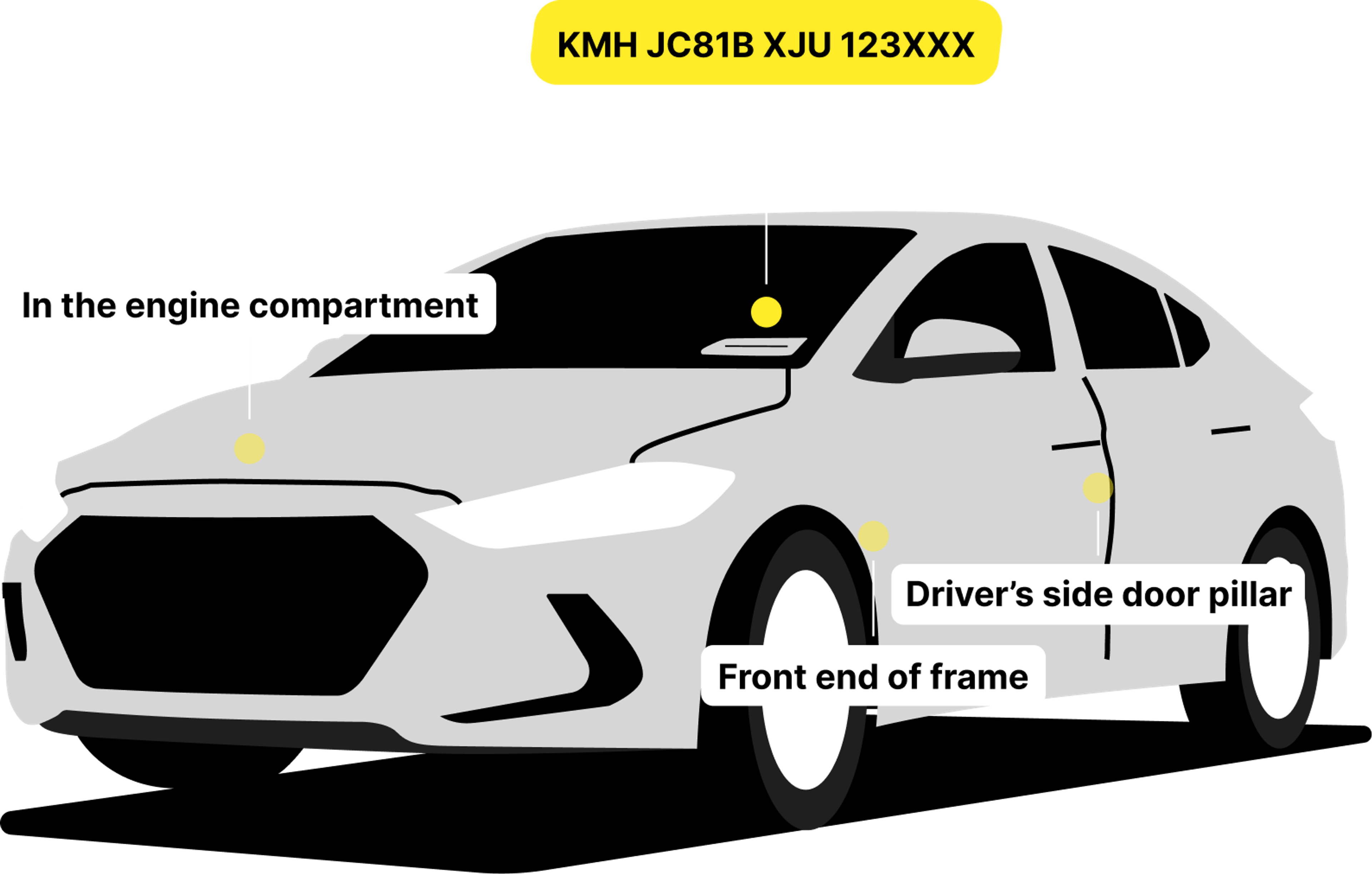 A vehicle’s VIN number is located in multiple places and can depend on the brand. However, there are specific common locations where the VIN is usually found in most vehicles.Here’s where you can find it in Hyundai cars:
- On the dashboard near the windshield
- On the driver’s side door pillar
- In the engine bay, on the firewall
- In front of the front passenger’s seat
Make sure the numbers in each location match, and there are no signs of tampering.
What Hyundai models work with our free VIN decoder?
List of Hyundai models
Current models:- Hyundai HB20
- Hyundai i10
- Hyundai i20
- Hyundai i30
- Hyundai Accent/Verna
- Hyundai Elantra
- Hyundai Grandeur
- Hyundai Ioniq 6
- Hyundai Sonata
- Hyundai Alcazar
- Hyundai Bayon
- Hyundai Creta
- Hyundai Ioniq 5
- Hyundai Kona
- Hyundai Nexo
- Hyundai Palisade
- Hyundai Santa Fe
- Hyundai Tucson
- Hyundai Venue
- Hyundai Santa Cruz
- Hyundai Genesis
- Hyundai Galloper
- Hyundai Ioniq
- Hyundai i40
- Hyundai ix20
- Hyundai ix25
- Hyundai ix35
- Hyundai Terracan
- Hyundai Tiburon/Coupe
- Hyundai Veloster
Is a Hyundai VIN decoder available for a free VIN check?
 History reports aren’t free because raw data is taken from various reputable sources, processed, and provided in a simple and easy-to-understand way.
Car history report
Avoid costly problems by checking a car's history. Just enter the VIN and get a full report.
Trusted by 6,000,000+ people across 37 countries




Frequently asked questions
Check car VIN number by make: